Float & Pop: The Art Stopped Him in 2020. With Ludo, He Shipped in Six Weeks.
- Platform
- iOS, Android
- Engine
- Unity
- Genre
- Arcade balloon battle
- Release
- Out now on the App Store and Google Play
- Team
- Solo
- Ludo Tools
- Sprite Generator (Animate), Audio Generator
Mohammad El Khatib writes backend code for a living. He has been trying to make games since 2018, and for a long time the same thing ended every attempt: the art.
"I'm a backend developer, so the code side of a game never scared me. The art did. I started a 2D side-scrolling airplane game around 2018 and had the gameplay working in months, but every project hit the same wall: I couldn't draw the characters myself, programmer art made the game feel unfinished, and hiring an artist or buying assets was either too expensive or never matched the style I had in mind. After three abandoned projects I stopped trying in 2020."— Mohammad El Khatib, developer of Float & Pop
In November 2026 he released Float & Pop on the App Store and Google Play, under his studio name MKCoding. It is an arcade balloon battle inspired by the retro classic Balloon Fight. You tap to flap and hold a direction to steer, and the flight is floaty and full of momentum. Get above a rival and land on their balloons to pop them. A popped rival parachutes down and starts pumping a fresh balloon, so you race to reach them before they float again. Birds dive at you, a fish waits in the sea below, and the coins you earn buy new balloons, shapes and parachutes. It is free on iPhone and Android.
The first commit was on 24 September 2026. Version 1.0 was ready on 1 November, after five to six weeks of evenings and weekends.
"This time the art stopped being the bottleneck. With Ludo I could describe a character, get a sprite in a consistent style, and turn it into an animated spritesheet the same day. That meant I could spend my time on what I'm actually good at: game feel, systems and shipping. Float & Pop went from an empty Unity project to the App Store and Google Play in about six weeks."— Mohammad El Khatib
What Ludo made
"Almost every character on screen is a Ludo asset."— Mohammad El Khatib
By his count, that is 4 animated characters across 20 animation clips, plus the balloons, the parachutes and all of the audio:
- Dan, the first pilot: 7 clips (idle, walk, run, flap, fly, falling and shocked).
- Tati, the second pilot: 5 clips (idle, run, fly, falling and shocked).
- The rivals: 6 clips (idle, run, fly, parachute glide, pumping a balloon and defeated).
- The birds: 2 clips (flap and dive attack), plus a leaping fish as a hazard sprite.
- Balloons and parachutes: balloons in 10 colours, star, heart and rival balloon sheets, and 5 parachute designs.
- Audio: 37 sound effects (pop, flap, splash, thunder, fish chomp, UI taps) and 14 music and ambience tracks.
He used three Ludo tools. The Sprite Generator gave him the base design of each character. Sprite animation turned each one into a spritesheet per action. And the Audio Generator made the sound effects and the music.
Time and money
- The whole game: five to six weeks of evenings and weekends, from the first commit on 24 September to version 1.0 on 1 November 2026.
- One character: about 3 hours for a full set of animations, from the first design prompt to working states in Unity.
- One more animation: about 10 minutes.
- Ludo: about 400 credits for the whole project, inside a single month of the Pro plan ($50, 1,000 credits).
- Commissioned instead: at least $1,500 to $2,000 for the same art and audio, by his own estimate.
"I used only 400 credits for the whole project!"— Mohammad El Khatib
From a Ludo spritesheet to Unity's Animator
Mohammad built the game in Unity, with UI Toolkit and the New Input System, and the Ludo spritesheets go straight into Unity's own Animator. Each animation leaves Ludo as one high-resolution spritesheet per action, most of them with about 35 frames. From there it is four steps:
- Slice. He imports each sheet as a Multiple-mode sprite and slices it in the Sprite Editor, so every frame becomes its own sprite, with the pivot at the character's feet.
- Clips. He drags the sliced frames into an Animation Clip at roughly 30 frames per second, so most loops last about a second. Idle, run and flap repeat. One-shots like "shocked" and "defeated" play once.
- States. Each character has a small Animator Controller. Dan's has 5 states driven by 4 parameters (Speed, Grounded, a Flap trigger and Popped), and the rivals add Parachuting, Pumping and Defeated.
- One script. A single script reads the physics every frame and sets those parameters, so the art always matches what the character is doing.
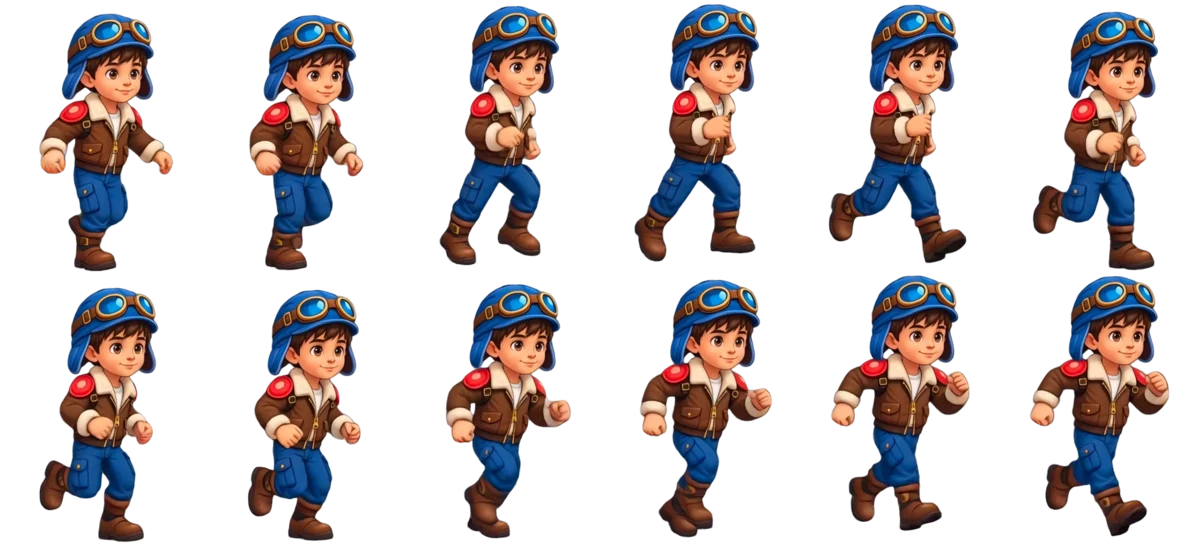
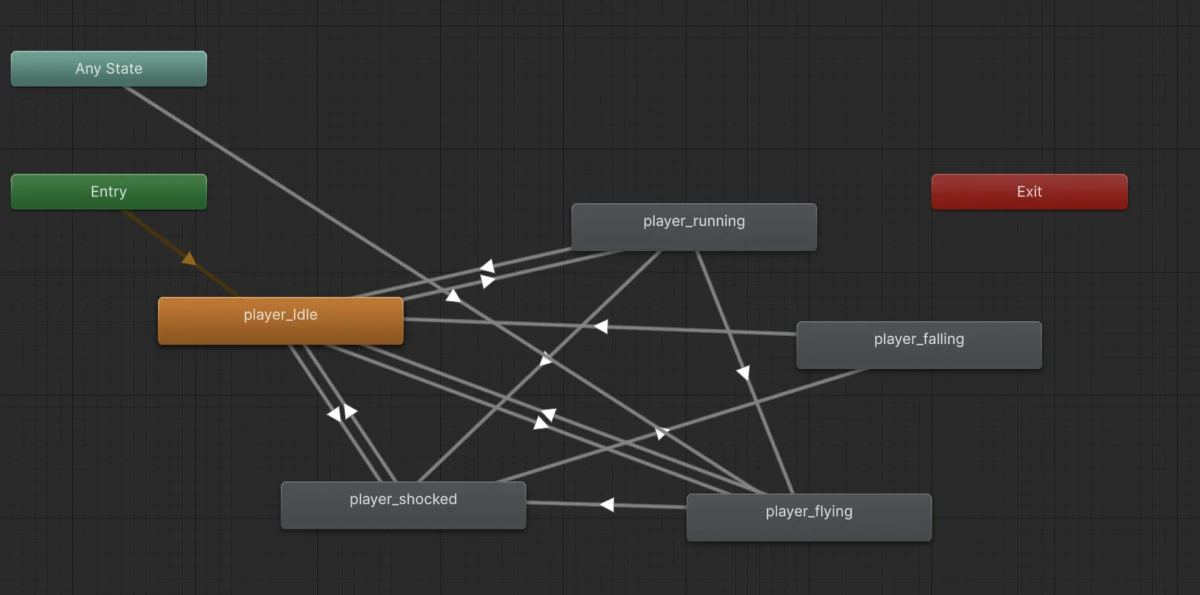
The second playable character cost him no new logic at all:
"Tati doesn't have her own state machine. She uses an Animator Override Controller that swaps Dan's clips for hers, so adding a second playable character took no new logic."— Mohammad El Khatib
That is the part worth copying. Because Ludo gave him the same set of actions for both pilots, a new character is a new set of sheets dropped into an existing controller.
The tool he wrote himself
A game about balloons has one detail that generated art cannot know about: the strings. Each pilot holds their balloons, and the hands move in every frame of every animation. Mohammad solved it the way a backend developer would, with a tool.
"The balloon strings have to stay in the character's hands in every frame, so I wrote a small editor tool that scans each frame of a sheet and records where the hands are. The strings then follow the hands through the whole animation."— Mohammad El Khatib
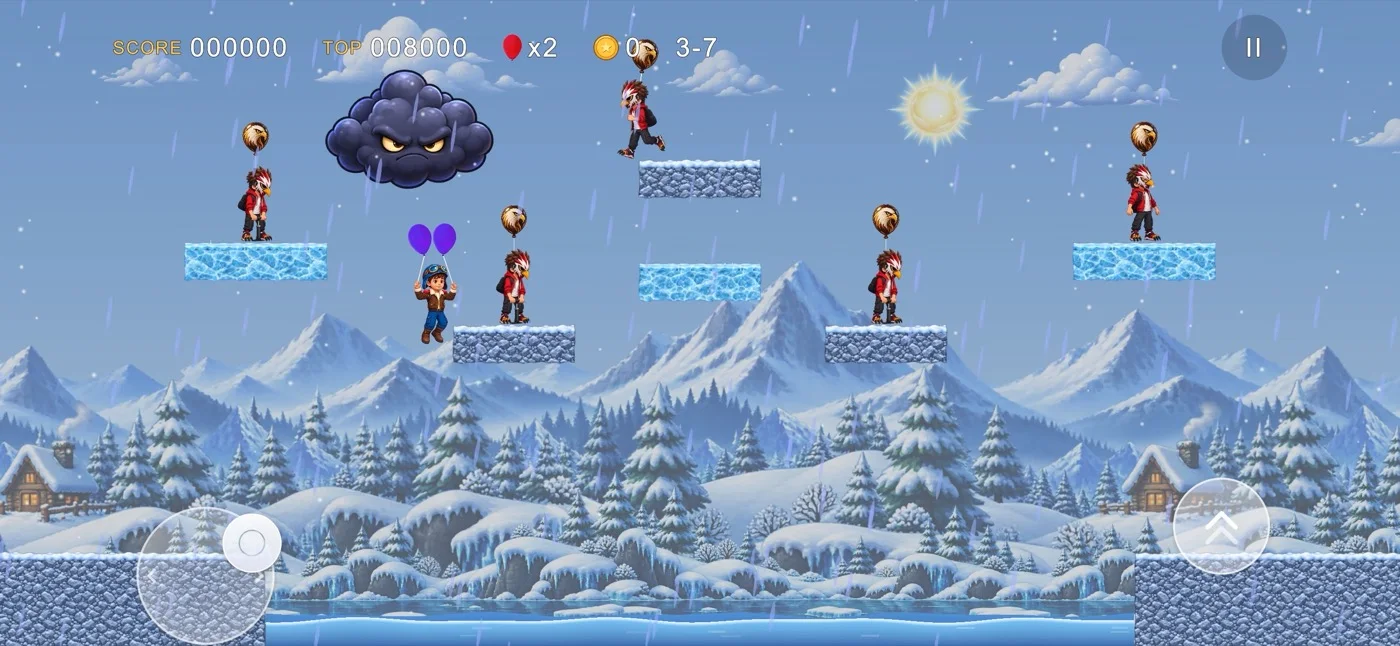
The division of labour is the one he wanted from the start. Ludo draws and animates the cast and makes the sound. The game feel, the systems and the shipping stay with him.
Where to find Float & Pop
An arcade balloon battle with floaty, momentum-based flight, two pilots, rivals who parachute down and pump themselves back up, diving birds and a sea you do not want to fall into. Free on iPhone and Android.
Float & Pop on the App Store
Float & Pop on Google Play
floatandpop.mkcoding.com