
AI Game Sound Effects & Music Generator
Generate custom sound effects, music, character voices, and seamless audio loops for your game. Describe the sound you need and download a studio-quality asset in minutes, with no recording equipment and no stock-library hunting.
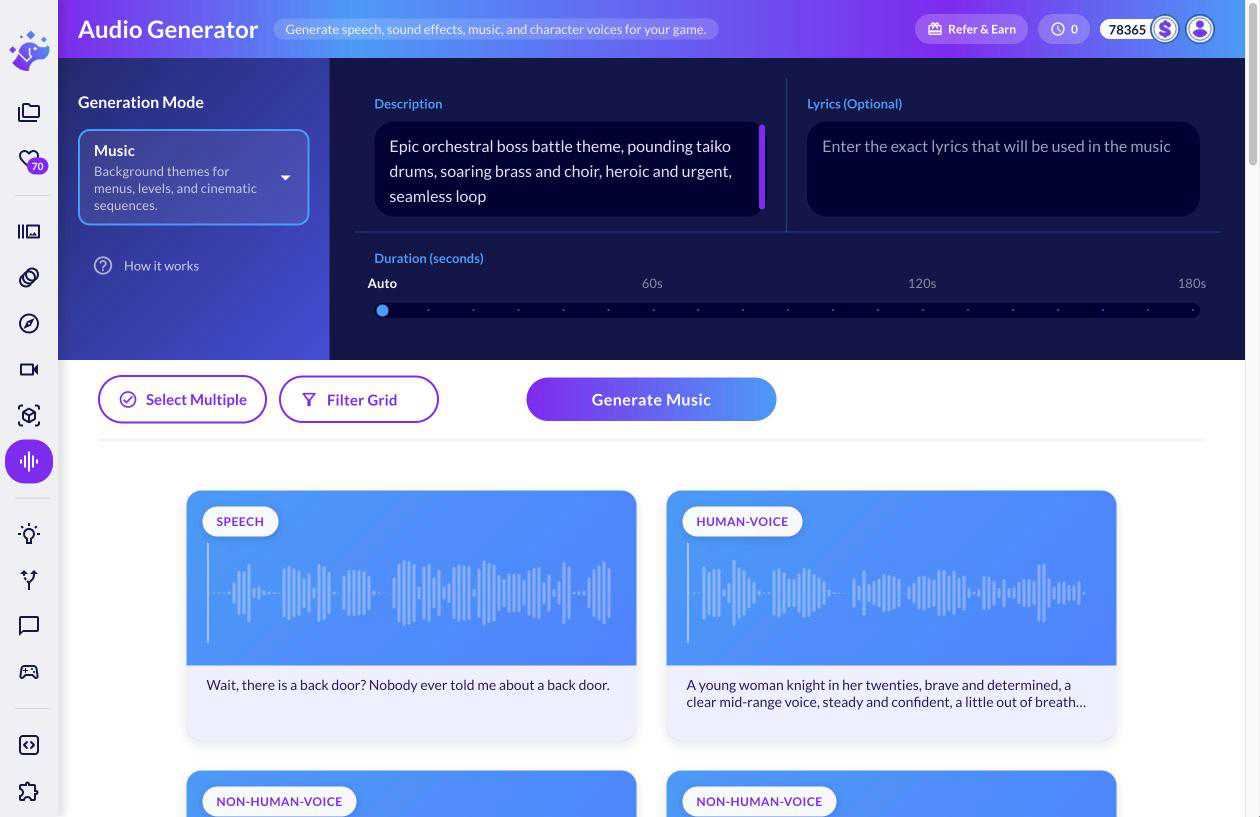
What is an AI audio generator for games?
An AI audio generator turns a text description into ready-to-use game audio. Ludo makes sound effects, music with or without lyrics, seamless ambiance loops and remixes of any track, plus character voices: human or non-human voices designed from a description or straight from the character's image, cloned voices for consistent dialogue, and 21 preset voices in 80+ languages. Describe what you need and download the clip in minutes, with no recording gear, voice actors or stock-library hunting.
How It Works
Pick a mode and describe the sound
Choose sound effects, ambiance, music, audio remix, a character voice, voice cloning or a preset voice, then write a plain-text description, dialogue line or set of lyrics. Music tracks can include your own lyrics, and voices can be human or non-human, designed from a description or the character's image.
Generate and refine
The AI synthesizes the asset from your prompt. Tune the result by adjusting the description and duration, cloning a voice you like for consistent dialogue, or remixing an existing track with a transform prompt.
Preview and download
Listen to the preview and download the finished audio, ready to drop into Unity, Godot, or any game engine. Sound effects and ambiances can be generated as seamless loops.
Watch a silent game get its whole soundtrack
Tali's game starts with no sound at all. The walkthrough builds every layer in the Audio Generator from a text description: footsteps, sword, coin and spell effects, the ambiance loop, the music and Tali's voice, with each prompt on screen.
How to Make Sound Effects for Your Game with AI: Footsteps, Sword, Spell, Ambiance, Music
Transcript: How to Make Sound Effects for Your Game with AI: Footsteps, Sword, Spell, Ambiance, Music
Tali: Wait, did you hear that? My footsteps! My sword! Oh, I have sound now, and it is wonderful!
Every one of those sounds, and her voice, came from a text description in Ludo's Audio Generator, so here's how to write one that comes out right.
In the Audio Generator, set Generation Mode to Sound Effects, then the whole job is the Description.
Our footsteps prompt has five parts, first the source, light leather boots, then the material, mossy stone slabs, then the action, running, quick even footsteps,
then the space, outdoors, close and dry, and last the length, which is the Duration slider, with Loop on because running repeats.
Generate, and it drops straight under her run.
Change one part and the sound changes, on soft grass the same prompt came back much quieter and softer in our run, so material is worth a word.
Tali: Stone! I knew it was stone. Now the sword, do the sword next!
Vague prompts miss, we typed just sword and got a blade ringing, not a swing, and our prompt never said what the sword was doing.
The full description names the action and the space, a quick steel sword swing with an airy whoosh, outdoors, close, and no impact.
Order matters too, the jump prompt asks for a cloth whoosh on takeoff, then a landing thump on stone, two events in one file.
The coin asks for one sparkly two-note chime, and the spell for a soft rising shimmer with crackling violet sparks.
Same description again gives a different take, our coin was one note, then Try Again and Generate gave us two notes.
For a variation of a sound you like, Remix on its card opens Audio Remix with it as the sample. Describe the change, and ours came back heavier and darker.
For the level's bed, Ambiance Loops, describe the place and the time of day, breeze through leaves, distant songbirds, faint insects, and say no music.
Loop is on by default here, so it repeats without a seam, and the Duration we set came back exactly, ten seconds.
Then Music for the same scene, described by genre, instruments and tempo, all in the prompt on screen.
Tali: Oh. Oh, there's music now? Okay. This is my favorite level.
Now the full mix, and since our effects came back at very different loudness, level them in your engine or editor first.
Her voice works the same way, Human Voice designs one from a description, and Use as Reference on the result opens Speech (Clone) to read new lines in it.
So that's the whole soundscape from text, every prompt is in the pinned comment, and Ludo is at ludo.ai.
Tali: Your game's too quiet, I can hear it from here. Start free at ludo.ai, and give it a sound!
Hear What You Can Generate
Ludo lives where you build
Every generator in your terminal, your AI agent, your own code and the Unity editor. One account, one set of credits.
Explore developer toolsnpm install -g @ludoai/cliMCP serverAny MCP client, including assistants that can't run commands.https://mcp.ludo.ai/mcpREST APIYour own app, game server or pipeline.https://api.ludo.ai/api/Unity pluginGenerate and import assets inside the Unity editor.FAQ
The Audio Generator covers the full soundscape of a game: sound effects (combat, UI, movement, magic), music in any genre or mood, seamless looping ambiances for your levels, remixes of existing audio, character voices (human and non-human, from a description or the character's image), cloned voices and preset voices for dialogue. Each mode is driven by a short text description.
Yes. You can generate instrumental tracks in any genre, or bring your own lyrics and have the AI compose a full track with vocals around them.
Yes. Both ambiance soundscapes (forests, cities, underwater levels) and sound effects (footsteps, crackling fire, magical incantations) can be generated as seamless loops, ready to attach to levels or sprites in your engine.
Design a voice once by describing the persona or adding the character's image, then clone it with Speech (Clone) to produce any number of new dialogue lines in the same voice, each with an optional delivery note such as "angry, shouting".
Generated audio comes as MP3 or WAV. Sound effects and ambiance loops run up to 10 seconds (or Auto), music up to 3 minutes, and audio remixes from 10 up to 180 seconds. Voice design reads a line of up to 100 characters, and cloned or preset speech up to 250 characters a line. Everything is ready to import directly into your game engine.
Yes. The 21 preset voices speak 80+ languages, and Auto detects the language from your text. Instead of a fixed emotion list, you direct each line with a delivery note of up to 50 characters, like "whispering, nervous". You can also clone a voice from your own audio sample for fully custom narration.
Yes. With Audio Remix, upload an existing sound effect, ambiance or track, or press Remix on one you generated, and guide it with a text prompt such as "make it sound like an 80s synthwave track", controlling how strongly the original is modified. It's a fast way to restyle music or create variations of a theme.
Yes. Every audio mode (sound effects, ambiance, music, voice design including from a character image, cloned and preset speech, and audio remix) is available through the Ludo API, the Ludo MCP server and the Ludo CLI on the Pro and Studio plans, so you can generate game audio programmatically or directly from AI coding tools like Claude Code or Cursor.