
Gameplay & ideation
Visualize a mechanic before you build it - feel out pace, camera, and atmosphere in seconds, straight from a generated screenshot.
Top-down action RPG
Turn a text prompt, an image or a set of reference images into a 5 to 15 second video with a soundtrack.
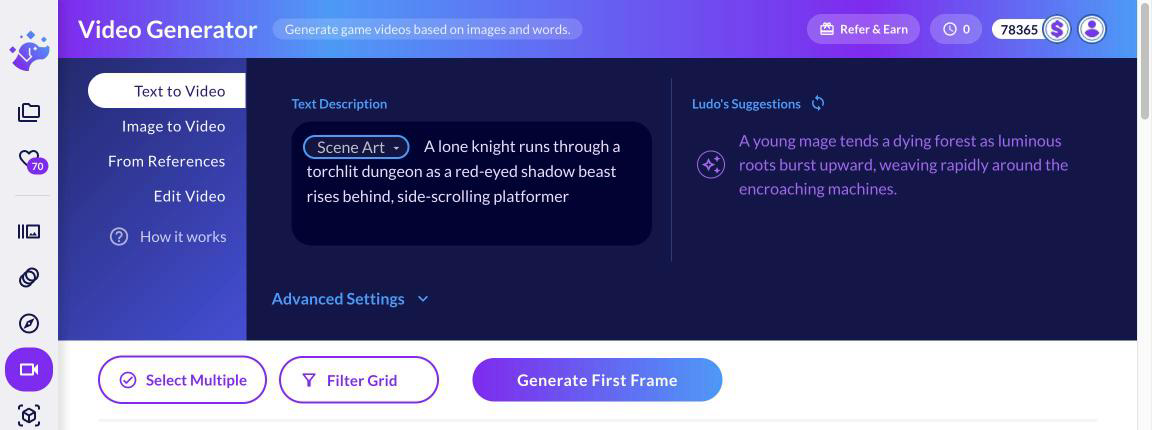
An AI video generator turns a text prompt, a still image or reference images into a short, animated MP4 clip. Ludo's Video Generator uses the Griffin HD model to make 768p clips from 5 to 15 seconds with a soundtrack. You can set a custom end frame, compose scenes from up to five reference images, edit a finished video with a prompt, and upscale it 2x.
Use Text to Video to generate a clip from a prompt, Image to Video to animate an existing picture, or From References to build a scene from up to five images. You can refine the starting frame in the built-in image editor first.
Write a motion prompt like "camera slowly zooms in" or "character waves", optionally set a custom final frame, then choose a length from 5 to 15 seconds. Griffin HD renders it at 768p for 2 credits per second.
The clip arrives with a soundtrack. Edit it with a text prompt, upscale a square clip 2x, then download the finished MP4.
Visualize a mechanic before you build it - feel out pace, camera, and atmosphere in seconds, straight from a generated screenshot.
Cinematic intros, story cutscenes, and high-energy trailer beats - straight from a single image or prompt.
Bring still character art to life - subtle breathing, hair, glow, eye movement - perfect for dialogue scenes.
Every generator in your terminal, your AI agent, your own code and the Unity editor. One account, one set of credits.
Explore developer toolsnpm install -g @ludoai/cliMCP serverAny MCP client, including assistants that can't run commands.https://mcp.ludo.ai/mcpREST APIYour own app, game server or pipeline.https://api.ludo.ai/api/Unity pluginGenerate and import assets inside the Unity editor.Four modes. Text to Video generates a first frame from your prompt and animates it, Image to Video animates a source image (uploaded or generated in Ludo) guided by a motion prompt, From References composes a scene from 1 to 5 reference images and a prompt, and Edit Video changes a clip you already generated with a text prompt. In Image to Video you can also set a custom final frame so the clip is interpolated between your start and end images.
Griffin HD makes clips from 5 to 15 seconds, in whole-second steps. You pick the exact duration before generating.
Griffin HD makes cinematic video in any style at 768p: 768x768 square, 1344x768 landscape or 768x1344 portrait. It runs every mode, from text and image to video to From References and video editing, and it generates a soundtrack with every clip.
Yes. Griffin HD generates a soundtrack together with every video, so you do not need a separate audio step. If you want dedicated game audio, Ludo's Audio Generator makes sound effects, ambiance loops and music.
Yes. Edit Video takes a clip you generated, a text prompt and up to 5 optional reference images, and returns a new clip that follows the source length, up to the Max Duration you set. You can also upscale a clip 2x when both of its sides are under 960 px, which means square 768x768 clips; landscape and portrait clips are already too large to upscale.
Videos are standard MP4 files you can download and drop into trailers, social posts or prototypes. From References also lets you choose the shape of the output: default, 16:9, 9:16, 1:1, 4:3, 3:4 or 21:9.
Video is billed per second of video. Griffin HD costs 2 credits per second for text and image to video, From References and video edit, with a minimum of 10 credits per clip, and a 2x upscale costs 0.2 credits per second. Credits are held when the job starts.
The generator is built for game creators: visualize gameplay concepts, animate characters and scenes, produce marketing content and trailers, or prototype motion ideas from a single image or prompt. You own the videos you generate with Ludo and can use them however you like, including in commercial games.
Yes. The Ludo public API, MCP server and CLI expose createVideo (from an image), createVideoFromReferences, editVideo and upscaleVideo. API and MCP results are kept for 7 days, and edit and upscale work on videos you generated in that window.