

Seed Your Next Hit Game with Ludo.ai’s Game Ideator
Generate fresh, unique game ideas in seconds by providing keywords, themes, genres, or existing game titles.
What is a Game Ideator?
A game ideator is an AI brainstorming tool that turns keywords, themes, genres, or even the titles of games you admire into fresh, fully formed game ideas in seconds. Ludo generates each idea as a concept seed with its own AI concept art and description, lets you explore follow-up variations, and develops any favorite into a full game design document.
How It Works
Add Your Inspiration
Enter keywords, themes, genres, or the titles of games you admire, or leave the box blank. Then set filters for genre, platform, art style and player perspective to focus the AI.
Explore the Concepts
Ludo generates a batch of game idea seeds, each with its own concept art and description. Like or dislike ideas to steer the AI, refresh for follow-ups, or generate more.
Develop Your Favorite
Turn any concept into a project and expand it into a full game design document, with concept art and similar-game references to build on.
Watch a game idea become a design document
Three words in the Game Ideator, one idea opened, and a game design document that fills itself in with Create Project, then grows section by section with Ask Ludo, every input on screen.
How to Come Up with Game Ideas with AI: 3 Words to a Game Design Document
- How to come up with game ideas with AI: three words in
- How to use an AI game idea generator (Game Ideator)
- The game ideas come back: title, pitch and concept art
- Open a game idea: the detail panel
- How to make a game design document with AI (Create Project)
- Ask Ludo and images inside the design document
- The whole path, and start free
Transcript: How to Come Up with Game Ideas with AI: 3 Words to a Game Design Document
Monster Light Keeper, this whole game idea, its concept art and its design document, started as three words in Ludo's Game Ideator.
This is the Game Ideator on ludo.ai, and it all starts in one box, which takes keywords, a theme, a mechanic or a game title, so we typed lighthouse, sea monsters. Under Filters everything is optional, and the one we set is the Art Style, Illustration, because it decides the look of every idea's concept art. Then Start New Generation.
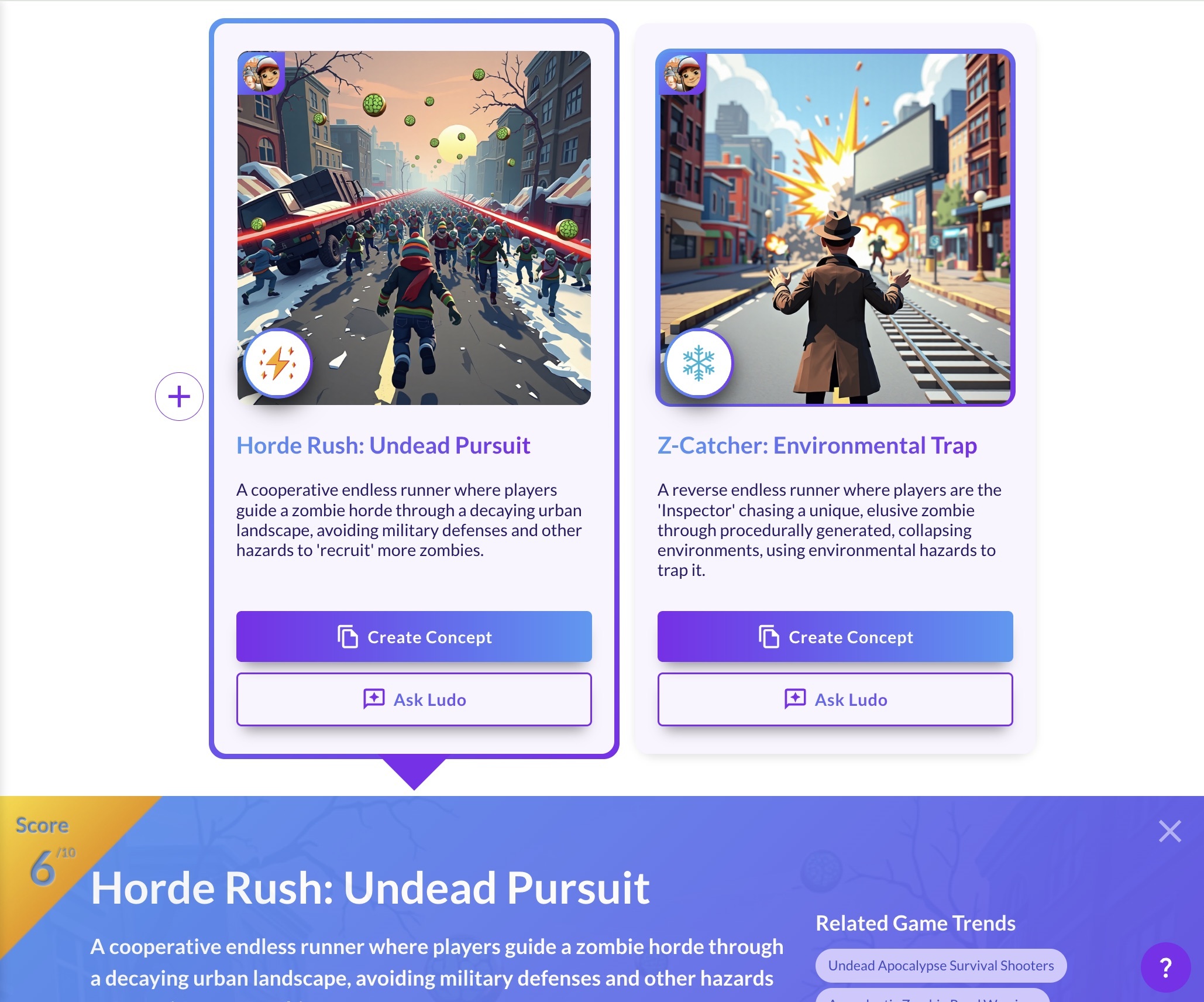
In our run three ideas came back, and each one is a card with a title, a short description, and its own concept art in the style we picked. The plus beside the grid makes more ideas with the same inputs, and clicking a card opens it. Every run is a new batch, so we scrolled back to an earlier run of the same three words, and that is where the idea this video follows, Monster Light Keeper, came from. KEEPER: Three ideas in a row, and that keeper is me.
It opens into its detail panel, with the title, the parameters it was generated with, Platform, Art Style and the hint it took from our words, then the pitch, and in our run a core loop, a setting, a key innovation and a progression. Below that are the actions, Create Project, Ask Ludo, which opens a chat about this idea, Copy Text, Generate Variations, which seeds a new batch with this idea, and Share Idea.
Create Project opens a modal with a checkbox, Automatically fill up content using Ludo's recommendations, which is on by default, so Ludo writes the sections for you. Each template is a set of sections, and clicking one creates the project, so we took Essential, which lists Mechanics, Objectives, Art Style, Universe & Setting, Playable Characters, Art and Gameplay. The document fills itself in, a title and description, an icon, a header image, and then each section, with text, and images where the section calls for them. That is the game design document, a living document you keep editing from here. KEEPER: A whole document about me, and I have not even fixed the lamp yet.
From here the project keeps working with you, because every section has its own Ask Ludo button, and the one on this mechanic opens a chat that already knows it. We asked it to make the mechanic riskier, and once we liked the answer, we pasted it right into the section. Then we asked for an illustrative image of that mechanic, and the picture arrives right in the chat. From there we just dragged it into the section, and it landed right above the mechanic. Inside any section the add menu can generate too, so we chose Image, then Generate, and it came back with pictures for this section, and the one we picked landed right next to the first. KEEPER: More pictures of my lamp, and it is still broken.
So that is the path, three words into the Game Ideator, one idea turned into a project, with Ask Ludo inside it, and every input we typed is in the pinned comment. KEEPER: I feed the monsters, and they fix my lamp. Start free at ludo.ai.
FAQ
What is the Game Ideator and who is it for?
The Game Ideator is Ludo.ai's AI brainstorming partner. It generates original game concepts on demand so solo developers, studios, and game designers can break through creative blocks and explore directions fast. It is built for the earliest stage of development, when you need an idea worth building, not just an asset.
What can I use as a starting point?
Almost anything. Type in keywords, themes, genres, or game mechanics, reference the titles of existing games you want to blend, or leave the box blank and let the filters guide the result. You can narrow results with filters for genre, platform, art style, and player perspective.
What does each generated idea include?
Every concept comes back as a self-contained idea with a title, a written description of the gameplay and theme, and its own piece of AI-generated concept art so you can immediately picture the game. When you blend existing titles, Ludo draws on those reference games to shape the result.
Can I steer or refine the ideas?
Yes. Like or dislike individual ideas to tell the AI what you are after, refresh to swap in new follow-up concepts, or hit Generate More Ideas to keep the batch coming. The more you interact, the closer the suggestions get to what you have in mind.
What happens once I find an idea I like?
Save it to your favorites, or click to develop it into a project. From there Ludo can expand the concept into a full game design document, pulling in concept art and similar-game references, so you can move from a one-line spark to a structured plan in the same workspace. You can also attach an idea to a message in Ask Ludo.
What if I have no idea where to start?
Use the Idea Pathfinder from the new project screen. It guides you through the questions step by step and then proposes game ideas from your answers.
Do I need design or art skills to use it?
No. The Game Ideator is built for fast, frictionless brainstorming: you describe a starting point in plain language and the AI handles the concepting and the artwork. It gives you a running start whether you are a seasoned designer or just exploring your first idea.
Does it use credits?
Yes, on the free trial and Indie: generating a batch of ideas costs 1 credit. On Pro and Studio, ideation is unlimited in the web app. Your free trial credits work in the Game Ideator.
Is the Game Ideator available through the API or MCP?
Game ideation runs inside the Ludo.ai web app. The Ludo.ai API and MCP focus on programmatic asset generation (images, sprite sheets, video, 3D models, and audio) rather than idea generation.