
AI-Powered 3D Asset Generator for Game Developers
AI 3D asset generation for games: create game-ready models from text or a 2D image, then auto-rig and animate them. GLB export with PBR textures, polycount control, and a choice of the low-cost Prop model or the detailed Hero model. No modeling skills required.
What is an AI 3D Model Generator?
An AI 3D model generator turns a text prompt, a 2D image, or an existing model into a game-ready 3D asset, so yes, AI can make usable 3D models for games, with no modeling skills required. Ludo.ai runs the whole game-ready 3D pipeline in one browser workflow: image-to-3D with PBR textures, polycount control and retopology, auto-rigging, and preset or prompted animation, exported as a single GLB with the rig and animation clips inside. Image-to-3D comes in two models: Prop (4 credits) for everyday props and environment pieces, and Hero (15 credits) for highly detailed close-up assets. The rig's bones can be named in the Mixamo (Unity), Unreal, Godot, Rigify (Blender), HumanIK (Maya) or VRoid/VRM convention, so the skeleton arrives with the labels your engine or DCC tool expects. Ludo's 3D asset generator outputs a textured GLB with PBR materials and exports to OBJ, STL, PLY, and OFF. You control polygon count and texture resolution, can re-texture or optimize any mesh, and can auto-rig any model, generated in Ludo or uploaded, with a skeleton in about a minute, then animate it from 640+ preset motions or a text prompt, with the rig and any saved animations exported together in the GLB.
How It Works
Generate the Model
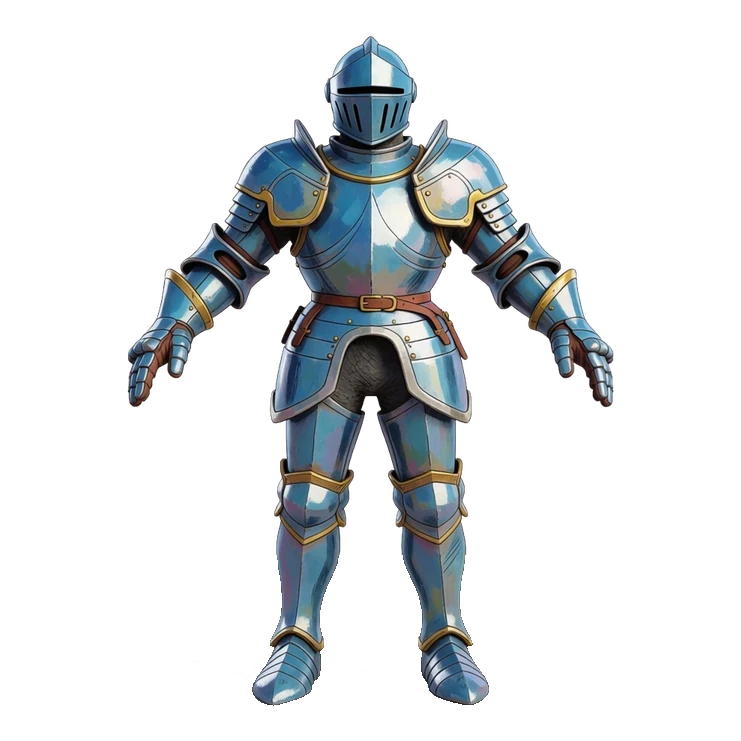
Write a text prompt or upload a 2D reference image, pick Prop or Hero, and the AI builds a textured 3D mesh you preview instantly in an interactive viewer.
Optimize and Export
Set max triangle count and texture resolution, optimize the mesh, then download as GLB with PBR textures or as OBJ, STL, PLY, or OFF.
Rig and Animate
Add a skeleton in about a minute, animate it with ready-made presets or a text prompt, and download the rigged GLB with your saved clips.
Watch a whole workshop of 3D models made in Ludo
Sprocket the goblin tinkerer, his dog Cog and every prop in his workshop, each from a typed sentence or a picture: the tour walks the whole 3D Asset Generator, from Text to 3D and Image to 3D to re-texturing, polycount, the auto rig, animation and a GLB that plays in Godot.
AI 3D Model Generator for Games: Full Tour (Text to 3D, Image to 3D, Auto Rig, Animate, Godot)
Transcript: AI 3D Model Generator for Games: Full Tour (Text to 3D, Image to 3D, Auto Rig, Animate, Godot)
The goblin, his dog and every prop in this workshop came out of Ludo, an AI 3D model generator for games.
Sprocket: Oi! My workshop. Mind the dog, he's new.
In ludo.ai's 3D Asset Generator, Text to 3D starts from a sentence: describe the asset, and Start New Generation.
Back comes a picture, then Create 3D Model, on Prop.
And there it is, a textured 3D barrel, brass hoops, tap and all, from one typed sentence.
The other seven props went the same way, one sentence each.
Sprocket: Eight props and not one splinter. Lovely.
To turn concept art into a 3D game model in Ludo, Image to 3D takes the picture straight, as the Reference Image.
The Model menu has two: Prop, for everyday props and environment pieces, and Hero, highly detailed, for close-up assets.
Prop also takes an optional Back View of the same subject; Hero works from the front picture alone.
The same barrel picture on both models: Hero follows it more closely, crisper hoops, deeper grooves.
His dog came from a sentence too, and a dog is a character, so we switched Prop to Hero first.
Sprocket: That's me, goggles and all. And that's Cog. Handsome pair.
Re-texture on the barrel's card opens Texture Generation, with the barrel in as the Reference Model.
Describe the new surface, rusty iron with rivets, and Start New Generation.
Back comes the same barrel in rusty iron, its shape untouched, and two more descriptions gave polished brass and frosted ice.
Sprocket: Three barrels from one? That's a trick I'd steal.
For the game, Optimize Model on the barrel's card sets Max triangles, from 1,000 to 200,000, then Process.
Same barrel, same look at game distance, with a fraction of the triangles.
Now Ludo's AI auto rig: Rig on Sprocket's card opens Rig & Animate with him as the Reference Model.
Rig type has three: General, for any type of asset, Humanoid, a full skeleton without finger joints, and Humanoid with fingers.
Joint naming relabels the same skeleton for seven tools, Mixamo, Unreal and Godot among them.
Sprocket gets Humanoid with fingers, and since our game is in Godot, Godot naming, then Rig Model.
Back comes Sprocket with a skeleton fitted inside him, 52 joints on ours, fingers included.
A dog is no humanoid, so Cog gets General, then Rig Model.
Sprocket: Fingers! I can finally hold a wrench. Properly.
Animate on the rigged card has two tabs: From Preset, with 641 animations in 34 categories, and From Prompt.
We picked Walk Forward, and Generate Animation.
The plus adds it to the GLB file, and Change Preset lines up the next: Repair Kneeling, Idle and Wave.
For creatures like the dog, the app points to From Prompt: describe a short motion in words, and Generate Animations.
Back come four takes to pick from; we kept this one, and the plus adds it to his file.
For a 2D game, Make Sprites sends the model to Directional Sprites: sprites from up to eight sides, any saved animation.
That tool has its own video, linked below.
Sprocket: Kneel, fix, wave. Give me a game already.
Download 3D Object, choose GLB, with textures, rigging and animations inside, and the same for the dog and every prop.
Godot imports GLB natively: the files land in the FileSystem dock, and each one opens as a scene.
Sprocket's scene carries his Skeleton and an AnimationPlayer listing every animation we added by name, and they play right here.
Drop in the props, press Play, and the workshop runs.
Sprocket strides in, kneels to fix his dog, and the dog looks up: every model in this room made with Ludo, without a 3D artist.
Sprocket: Good boy. Now stay off the anvil.
Subscribe for the next tour: the Audio Generator, from sound effects and music to voices for characters like Sprocket.
Sprocket: Your turn: start free at ludo.ai, build your own.
Ready to Drop into Your Engine
Characters, mounts, props, and buildings with PBR textures, GLTF export, and retopology baked in. Mesh complexity that suits your needs - from 1k to 200k triangles, you choose. Generated from text or a single image - drop straight into Unity, Unreal, or Godot.
From Static Mesh to Game-Ready Skeleton
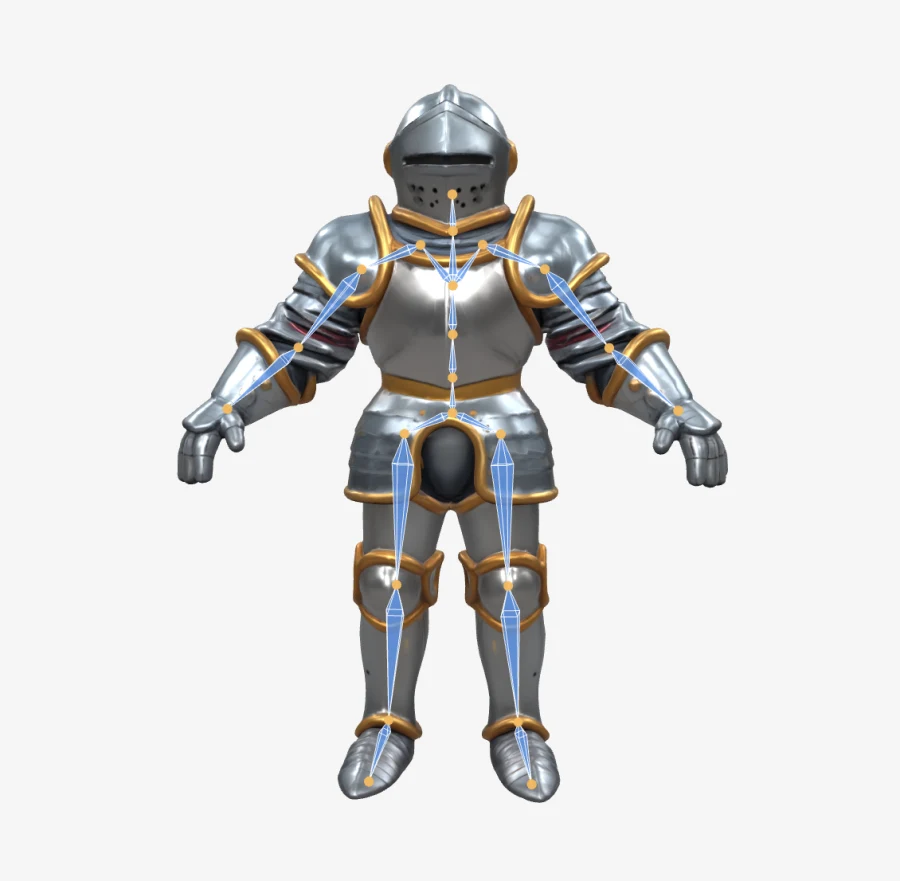
Ludo's auto-rigging adds a skeleton to any 3D model - generated in Ludo or uploaded - in about a minute. Show the skeleton in the viewer, drag joints to check how the mesh deforms, and export the model and its rig together as a GLB.
Once a model is rigged you can animate it two ways - apply a ready-made motion from the preset library (idles, runs, combat moves, emotes and hundreds more) or describe a custom one with a text prompt like "waving hello". Preview the takes on your model and save the ones you like into the download.
Animate It with Ready-Made Presets
Rig a humanoid once and animate it straight from a library of 640+ preset motions - locomotion, idles, melee and ranged combat, spellcasting, emotes, dances. One knight, four presets, zero keyframes. Every animation you save ships inside the GLB download as a named track.
Ludo lives where you build
Every generator in your terminal, your AI agent, your own code and the Unity editor. One account, one set of credits.
Explore developer toolsnpm install -g @ludoai/cliMCP serverAny MCP client, including assistants that can't run commands.https://mcp.ludo.ai/mcpREST APIYour own app, game server or pipeline.https://api.ludo.ai/api/Unity pluginGenerate and import assets inside the Unity editor.FAQ
It's an AI tool that creates game-ready 3D models from a text description, a 2D image, or an existing model. It supports three modes (Text-to-3D, Image-to-3D, and Texture Generation), so you can generate, convert, or re-texture assets without any 3D modeling experience. Rigging and animation sit in a fourth tab, Rig & Animate.
Yes. The Image-to-3D mode converts a single 2D image (concept art, a character sprite, a sketch, or a photo) into a textured 3D model of that character or prop. You can also start purely from a text prompt with Text-to-3D, or describe the texture you want for an existing mesh.
You can download models as GLB (which includes the textures), or as OBJ, STL, PLY, and OFF (geometry only, without textures). GLB is the recommended format for dropping a fully textured asset into a game engine.
For the Texture Generation mode you can upload your own model in OBJ, PLY, STL, OFF, GLTF, GLB, FBX, 3DS, DAE, CTM, or X3D format, up to 20 MB. The file should contain only the subject you want to texture.
Yes. Advanced settings let you set a max triangle count from 1,000 up to 200,000 (default 50,000) and an adaptive decimation level that simplifies the mesh without losing detail. You can also choose a texture resolution of 1024 or 2048, and a texture type of PBR, Color, or None.
Yes. The Optimize Model tool re-topologizes a mesh to your target triangle count and texture resolution for better in-engine performance, and Re-texture generates fresh AI textures for a model you generated in Ludo or uploaded yourself.
Yes. The create3DModel tool is available through the Ludo API, the Ludo MCP server and the CLI, converting a 2D image into a GLB model with PBR textures. It returns a model URL plus snapshot images and typically completes in a minute or two. The default Prop model costs 4 credits per model; the Hero model costs 15 credits. Rigging, text-prompted animation and preset animation are available the same way. API and MCP access is included on the Pro and Studio plans, and results are kept for 7 days.
No. The generator handles meshing, texturing, and optimization automatically from your prompt or image. You preview the result in an interactive 3D viewer and export a ready-to-use file, with no sculpting, retopology, or UV-mapping skills required.
Yes. Use the Rig & Animate tab in the 3D Asset Generator, or hit Rig on any generated model card. It works on models you generated in Ludo and on meshes you upload yourself (OBJ, PLY, STL, OFF, GLTF, GLB, FBX, 3DS, DAE, CTM, or X3D, up to 20 MB). Pick General for any mesh, or Humanoid (with or without fingers) for a standard named skeleton; rigging takes about a minute and costs 1 credit. Re-rigging saves a fresh variant, so your original model is never lost.
Yes, two ways. From Preset applies a ready-made animation from a library of 640+ motions (locomotion, idles, melee and ranged combat, spellcasting, emotes, dances and more) to any rigged model, whatever its rig type, though retargeting does not succeed on every model. From Prompt generates motion from a short text description like "waving hello" and returns four candidates to choose from. Either way you preview the result on your model, and every animation you save is included in the download as a named animation track. Both cost 0.5 credits at the current promotional price.
GLB. The GLB download includes textures, rigging, and any animations you saved. STL, PLY, OBJ, and OFF export the static mesh only, without textures or a skeleton.
Yes. The GLB you download is a standard glTF binary with textures, the skeleton, and your saved animations in one file. Godot and Blender import GLB natively, and Unity imports it through the official glTFast package. If you only need the static mesh, OBJ and STL exports work everywhere 3D software runs.
Auto-rigged skeletons use SMPL joint names by default. In the rig options, and through the Ludo API and MCP server's joint_naming option, you can relabel the same skeleton to match the convention your pipeline expects: Mixamo (Unity's humanoid auto-mapper), HumanIK (Maya, MotionBuilder, FBX pipelines), Unreal (the UE mannequin), Godot (SkeletonProfileHumanoid), Rigify (Blender), or VRoid (VRM). Only the names change and the skeleton is identical, so humanoid retargeting tools can map your character automatically.
Game-ready means you can drop it into an engine without a cleanup pass: a single GLB with PBR textures, a polygon count you chose, and, if you rigged it, a named skeleton and animation tracks. Ludo gives you control at each step: set the polycount and texture resolution at generation time, run Optimize Model (retopology) on a mesh that came out heavy, re-texture without regenerating geometry, and add the rig only when a model actually needs to move.
Both turn an image into a textured 3D model. Prop is the low-cost default (4 credits) and suits everyday props and environment pieces; it also takes an optional back view of the same subject, so the back of the model follows your picture instead of being invented. Hero (15 credits) is built for highly detailed, accurate close-up assets such as characters. It uses the front image only, with no back view, and Texture Generation runs on Prop. Pick Prop to fill a level quickly and Hero for the pieces the camera gets close to.
A textured Prop model is 4 credits, a rig is 1 credit and an animation is 0.5 credits at the current promotional price, so a generated, rigged, animated character is about 5.5 credits. Re-texturing is 2 credits and optimizing a mesh is 1. That is roughly 60 Prop models a month on the Indie plan. The Hero model is 15 credits per model. Text-to-3D adds the 0.5-credit concept image it starts from.